Showing posts with label PPC Benefits. Show all posts

Wednesday, 12 June 2013

How to Use Simple Math to Get Better Insight PPC

I highlighted how you can assess the value of your campaigns average KPIs and how to identify outliers for better campaign insights. I will continue showing you how to improve the value of your campaign with some simple math tips. We will continue to use the example of setting up a new ad group to promote fireplace components.

If you remember from my last post, after we identified that we were going to focus on quality and service as the selling points for this new ad campaign, we developed two different forms of ad copy to reflect each campaigns’ different value proposition. I’ve listed out the results below. Now, what do you think? Should we remove Ad Copy #2 and just keep Ad Copy #1 because its average CTR is higher?

EXAMPLE One: CTR Performance Comparison Between Two Ad Copies

Screen Shot 2013-06-12 at 6.27.33 AM

Step One: Use Standard Deviation to Remove Outliner

As illustrated in the Part I of this series, before comparing the averages, we need to separate outlier (i.e. values that fall outside 2 standard deviations from the average) from the rest of the values. As you can see, the CTR on Day 6 of Ad Copy #1 is outside a reasonable range, so we don’t include Day 6 while comparing the performance between Ad Copy #1 and Ad Copy #2.

EXAMPLE Two: Use Standard Deviation to Remove Outlier

Screen Shot 2013-06-12 at 6.27.40 AM

Step Two: Use T-Test to Confirm the Difference

After removing the outlier, the updated average for Ad Copy #1 is 4% vs. 5% for Ad Copy #2. We can use a T-Test to confidently declare those two ad copies perform significantly different. (I am aware of any terms with “test” within could be intimidating so allow me to comfort you a bit by revealing that the T-Test was originally developed to test quality of beer. Call it Beer-Test if it soothes you. J) The following are things you need to know about this simple test:
  • T-Test is an one-way test, if the outcome doesn’t support our assumption (i.e. two ad copies perform differently) it does NOT suggest the opposite is true (i.e. two ad copies perform the same)
  • You can use it to validate the outcomes from Before/After Test on one set of objects
  • You can use it to validate the outcomes from A/B Test on two sets of objects
  • In general, T-Test value > 0.05 implies your assumption is NOT correct (i.e. the chance of your assumption is not correct > 5% )
  • The easy way to perform a T-Test is using Excel T-Test function
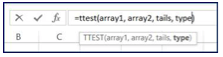
EXAMPLE Two: Excel T-Test Function

Screen Shot 2013-06-12 at 6.27.51 AM
  1. Array 1: the first data set
  2. Array 2: the second data set
o Tails
  1. To validate the conclusion of one data set performs better than the other
  2. To validate the conclusion of one data set performs differently from the other (i.e. could be better or worse)
o Type
  1.  For Before/After Test
  2. For A/B Test with a same standard deviation
  3. For A/B Test with a different standard deviation other (i.e. could be better or worse)

EXAMPLE Three: Use T-Test to Confirm the CTR Performance Difference Between Two Ad Copies

Screen Shot 2013-06-12 at 6.27.57 AM

To compare two ad copies with different standard deviations, we should apply 2 for tails and 3 for type while using Excel’s T-Test function and the formula looks like “=ttest(array of Ad Copy #1 CTRs, array of Ad Copy #2 CTRs, 2,3)” with an outcome of 0.4 which means: we cannot confidently declare those two ad copies perform differently because the chance of our assumption is wrong is 40% . Is it because there is no difference or we need more samples? Let’s add more power to our analysis.

Step Three: Use Power Analysis to Identify Sample Size

In a statistical test, power is the probability that the test result could help us confidently confirm our  assessment and Power Analysis is a simple math we can use to calculate the minimum sample size which enables us to confidently decide whether those two ad copies perform differently. Before conducting Power Analysis, you need to know:

• Required parameters
  • Tails
  •             One-tail: To validate the conclusion of one data set performs better than the other
    • Two-tail: To validate the conclusion of one data set performs differently from the other
  • Test value: the value you would like to compare to sample.
  • Sample average
  • Sample size
  • Sample’s standard deviation
  • Confidence level
• Analysis Outcomes
  • Result of Power Analysis is between 0 and 1.
  •             0:0% possibility to confirm the assessment based upon the given parameters
  •             1: 100% possibility to confirm the assessment based upon the given
  • For conducting T-Test, we need an outcome of 0.8 or higher from Power Analysis to confirm our assessment parameters
Many universities and research institutes offer Power Analysis tools on their websites to help us conduct this analysis with ease – for example, for example, here is a good one from DSS Research. For our case (tail: 2, test value: 4%, sample average: 5%, sample’s standard deviation: 2%, confidence level: 95%), after entering those parameters into its Power Analysis tool, I learned 32 good samples are required to confidently confirm our assessment. Conclusion: Let’s keep collecting data for now.

In Part III of this series, we will re-visit those two ad copies’ performance. But until then, today’s takeaways are:

1. Having the right samples is a critical step for any analyses. Use Empirical Rule (aka 2-Standard-Deviations Away You Are Out Rule) to control the quality of the sample and use Power Analysis to check its quantity.

Power Analysis to check its quantity.

2. Don’t jump into conclusions based on face value of the numbers. Instead, apply a T-Test to confirm your assessments.


3. T-Test results only confirm one side of story (i.e. “those beers taste no different” does NOT confirm “those beers taste the same”), so clarify your assessment before put it to the test.

Email : naturalseosolution@gmail.com | Mo : 8763723377 | Skype : sunmoon.mohanty

Monday, 20 May 2013

PPC Tracking and Goals – You May Be Getting Them Wrong


What makes up a paid search account? Of course you have your website and your account manager platform(s), most likely AdWords and Bing Ads. You also have your campaigns, ad groups, keywords, & ads. But are you forgetting your tracking, and are you creating appropriate goals?

One too many times I have had clients who have either missed the boat on tracking implementation or have designated goals that are not relevant to the reason why their site was created in the first place. It’s extremely important that you understand the possible fallacies of each particular paid search characteristic in order to ensure that you are running a successful paid search account.

In this post, we’ll explain why and how to use the Google Tag Manager to plug holes (and improve accuracy) in your tracking, and we’ll explain how to set up actionable goal reporting in AdWords and Google Analytics

Use the Google Tag Manager for Tracking

This one seems simple: no tracking, no data. So get tracking and you will get data. Easy enough, right? Wrong. Before you go and drop pixels all over your website coding, be sure you are aware of all of your options.

Because new pixels keep showing up from various sources, it would be best to implement or have your development team implement the Google Tag Manager. This will give you more control on all the pixels, also known as tags, within your site if you don’t deal with the coding. If you do deal with the coding, then this will make your job much easier and keep your pixels together.

The Google Tag Manager just creates one pixel for you to add. Once the container tag is added, you can manage all other tags within the Tag Manager. The container tag can also speed up your loading time for your pages. This isn’t because fewer pixels are firing, because there shouldn’t be fewer pixels firing, but because the container snippet executes asynchronously.


The tag manager also has two features that I am a huge fan of. The first is the preview mode. This allows you to review how your tag will work to make sure it is firing correctly. The other is that it gives you the ability to create rules and macros to tell the tag when to fire. This option provides a lot of flexibility, as you can create rules/macros based on URLs, referrals, events, and other custom values such as how much a user spends.
The advantages to implementing the Google Tag Manager snippet are endless. But just to review what we went over, here is a list of the benefits of using the Google Tag Manager:
  1. Don’t need to bug your development team to keep adding tags
  2. Organizes all of your tags in one location for easy management
  3. Can speed up the loading time of your site
  4. Can create rules and macros to tell the tag when to fire
  5. Can use the Tag Manager for Google & non-Google tags
  6. Preview mode enables you to ensure tags are firing appropriately
The container tag snippet should be placed on every page within your site at the top of the opening body tag. The only exception is that if there are any variables that the container snippet should use that fire on the page load, the container snippet should be placed underneath those variables but still within the body tag. And while you implement the container snippet, be sure to remove those existing pixels that have been added to the tag manager. Otherwise you will be double-counting.

If you are not using the Tag Manager because your site uses few pixels, be sure that you are recording the most accurate data. For example, if you are recording registrations, be sure that you have a page that only shows up when the user has registered, such as a thank-you or confirmation page. Here’s a scenario where loose recording can complicate things:

There will be people who, by force of habit, click through a paid ad even though they have already been to your site and registered. When they do this, depending on where your pixel is placed, it will cause the pixel to fire again even though they have already registered. In this scenario, it is usually the branded keywords that are inflated.

While you may have some third-party platform that accurately records conversions, the scenario still creates a few problems. The first is that it makes data-gathering more tedious and more time-consuming. The second is that because there are extra steps in gathering data, this increases the likelihood of errors. And the last problem is that not having accurate data in AdWords pretty much rules you out of using any neat features that Google comes up with, such as the conversion optimizer.

Set Up Smarter Goal Reporting

There are many actions that can be tracked through Analytics. It is a great tool that should be used when evaluating data and patterns of your audience in order to optimize your site. And AdWords allows you to import your Analytics’ goals. (If you do this, be careful that you don’t double-count the data by assigning a goal in Analytics that resembles a conversion in AdWords. You can find more information on how to link Analytics & AdWords here.)


GOAL FLOW IN GOOGLE ANALYTICS

While all of this is helpful in developing strategies, it is easy to overlook the overall goal. Here’s a good way to break it down:
  • The overall goal, such as registrations or sales, should be tracked in AdWords if you are buying into paid search.
  • The steps before and after the overall goal should be tracked in Analytics.
Let’s say you have a site that has four different ways a user can convert. One of those conversion types is getting a user to pay for a type of membership. The others are registrations, calls, & downloads. AdWords can track all of these but data behind their actions isn’t accurate because AdWords groups them all together. You can segment the conversion types, but then it gets complicated when dealing with the metrics.

If you know which conversion is the most important, it would be best to just track that one conversion in AdWords and track the other actions in Analytics. This will make more sense when it comes to optimizing for a stronger CPA, ROAS, or any other metric. Plus, this will give you more options to use AdWords’ features like the Conversion Optimizer.

After setting up your goals in Analytics and syncing with AdWords, you will be able to develop strategies on your landing pages. The strategies will be based on more information than just your conversion rate. You can see what is working and what isn’t within your pages. Leverage all of this data when coming up with new strategies, but make sure all of the data is being collected accurately and in a helpful and easy-to-read way.

Email : naturalseosolution@gmail.com | Mo : 8763723377 | Skype : sunmoon.mohanty

Monday, 13 May 2013

Thrifty Digital Marketing Strategies for Greater Search Engine Optmization


budget
Hi. My name is Jason and I’m a bit of a mental case. My wife likes to send me links to products she’d like to purchase and instead of looking at the new ottoman, I explore the website’s backlink portfolio or rip apart their URL structure. I just can’t contain myself sometimes; everything I come across is an opportunity to hone my skills, giving my clients that slight edge towards achieving the desired outcome. My site audit OCD boils down to a low budget method of learning new ways to utilize and incorporate advanced tactics into my digital strategies, making full use of resources that are available to me. Since digital marketing encompasses many different actions, every experience can be re-channeled into strategies or offer insights into how actions can be improved upon. The thriftiest of digital marketers realize this and will utilize every tidbit of information that they have at their disposal.
Repurposing Paid Digital Data
In a previous life I was an in-house digital marketer; PPC and SEO all day, every day. To make the most out of every task, I quickly learned to utilize one skill and apply it elsewhere because it opened up a slew of fantastic tactics that bettered my understanding and made the most out of all of the analytics at my disposal. Since the pay-per-click crowd is always looking for every last gain they can squeeze out of a campaign, a synergistic relationship is created with SEO because you can quickly:
  • Use ad copy to optimize title tags and meta data for click through rates
  • Use negative keyword data and keywords that don’t convert to see what keyword phrases don’t allow for success or gain new ideas for content
  • Turn banner ad or display network placements that are converting into new link building opportunities
  • Learn what landing pages convert and why, which can then be applied to other areas of the website even if conversion rate optimization isn’t being utilized
Not only is this information useful for search engine optimization but it can be helpful when crafting campaigns and messages for social media. I’ve seen some interesting information earned from the paid ad space that opened up micro-segments that I had previously written off or didn’t consider. Easy wins can make you look good, so love on the pay-per-click strategies and the folks who employ them!
No PPC? Hunt for High Impressions
Not into PPC? No worries, Google is giving SEO’s actionable information in Webmaster Tools with impressions and click-through rate details correlating to keyword phrases. Impressions are a good initial indicator that a website’s optimization is improving but marketers who are constantly pushing for greater gains know that high impressions with a low click-through rate equals lost opportunity. Experimenting, testing, and improving upon title tags and meta descriptions for the purpose of increasing CTRs will give search engines stronger signals when the on-page content is: superb, keeping users on site, visiting multiple pages and not bouncing.
It’s a bit of a mind boggle that Google would report this information as optimizing title tags and meta descriptions to increase your organic click-through rates steals the cheese from pay-per-click, lowering Google’s bottom line. Frugal and astute digital marketers will steal Google’s cheese while they can, and bask in the sweet, sweet rewards!
Email Tactics for Cheap Digital Marketing
While I despise my inbox, email creates some interesting opportunities and is often an underused piece of your digital marketing estate. With multiple employees sending hundreds, if not thousands (shudder) per day, strategizing email signatures are a penny pinching opportunity to subtle promote almost anything with trust identifiers. Our agency has a client who is a wedding DJ who also hosts and produces a syndicated weekly radio show which is available as a podcast on iTunes. In his email signature we included logos for both of his services and the related social media icons. Doing this slowly builds listenership and followers naturally but it also provides prospective clients the opportunity to learn more about him, his services, and expertise. He doesn’t just ‘spin the ones and twos’ on the weekends; he’s constantly improving his craft day in and day out. Highlighting this in an email signature provides one of the least aggressive sales pitches there are while leading prospects to other digital properties.
Send Love, the Digital Way
While we’re on the subject of electronic mail don’t overlook confirmation forms and auto responders. Confirmation pages and follow up emails such as ones that thank a customer for making a purchase or alert them that their order has shipped, have higher open rates and provide an avenue to further extend your brand voice. The hard work of earning the sale or sign up is done, but the economical marketer is focused on keeping that customer engaged. With the majority of these messages and landing pages containing drab boilerplate copy, the few that ooze cool quickly rise to the top keeping customers interested in your message and brand while potentially keeping them engaged with a website longer.
The inbox search function has gotten so good, I’ve quickly hoarded my way to a billion email messages that somehow only use 5% of my data limit. While I might be telling a lie, making the copy in your digital messages helpful to a customer will provide value, giving them the option to refer to it as often as they please instead of sending it to the digital waste bin. Including the top five frequently asked questions or even providing care instructions will only strengthen your message and keep it in digital storage.
Thrifty Ain’t Chintzy Digital Marketing 
These tactics only scratch the surface of what can be achieved by tapping into all the data that is available and looking at new ways to utilize it. I’ve found the easiest way to uncover golden opportunities is to ask myself, “how else could this be used?” Reducing waste and maximizing what you have at your disposal improves efficiency, maximizing the digital marketing dollar.
Email : naturalseosolution@gmail.com | Mo : 8763723377 | Skype : sunmoon.mohanty